
Customer Support · head to head
Kustomer vs SoftSync AI

The short version
- Each has a real cost: Kustomer pricing not published; requires customised sales assessment and quote for exact costs; SoftSync AI the Trust Centre describes ISO 27001 and SOC 2 Type II as "alignment" rather than certification, with documentation available on request (checked November 2026).
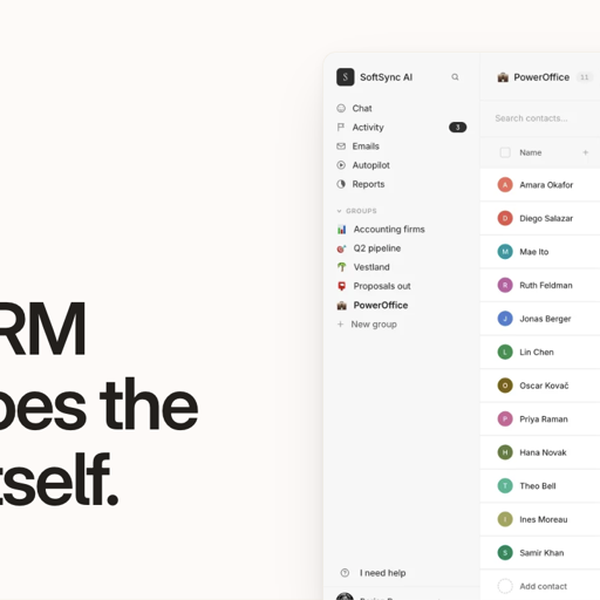
- They diverge on capability: Kustomer covers Unified customer view, SoftSync AI covers Flexible CRM records.
- Prices and features above were last checked on 12 November 2026.
Where they differ
Only the attributes on which Kustomer and SoftSync AI actually diverge.
| Attribute | Kustomer | SoftSync AI |
|---|---|---|
| Starting price | On request | $29/month |
| Pricing model | quote | subscription |
| Platforms | Web, Cloud | web |
| Category | Customer Support | CRM |
| Founded | 2015 | Unknown |
Identical on both: free tier (No), user rating (Not yet rated).
What each one covers
Drawn from each product's published feature list. An absence here means we hold no record of it - not that the product lacks it.
Only in Kustomer
- Unified customer view
- AI automation
- Omnichannel
- Workflow automation
- Knowledge base
- Analytics
- Shopify
- Magento
Only in SoftSync AI
- Flexible CRM records
- Bot-free Note Taker
- MCP server
- AI Assistant and Autopilot
- REST API
- Email, campaigns and SMS
- Booking, documents and e-signature
- Lead database and Chrome extension
What people use each for
The jobs each tool is most often brought in to do.
Kustomer
- Large B2C and B2B organisations managing 600+ customer support interactions across omnichannel platformsnot SoftSync AI
- Retail, financial services, travel and hospitality sectors requiring integrated AI-powered supportnot SoftSync AI
- Enterprises seeking customer 360 views and advanced workflow automationnot SoftSync AI
SoftSync AI
- Founder-led sales where meetings, follow-ups and the pipeline need to live in one recordnot Kustomer
- Turning call notes into CRM updates without a meeting bot in the callnot Kustomer
- Letting Claude or ChatGPT read and update CRM records over MCPnot Kustomer
- Replacing a separate booking tool, note taker, e-signature app and spreadsheet CRM for a small teamnot Kustomer
- Moving off a Notion or spreadsheet CRM while keeping custom fields and stagesnot Kustomer
Where each one falls short
Documented limitations, not opinions. Every one is a constraint you would hit in normal use.
Kustomer
- Pricing not published; requires customised sales assessment and quote for exact costs
- Voice (call), SMS, and WhatsApp support operate on separate pay-as-you-go pricing models
- Customisation-based pricing structure means no transparent cost comparison with competitors
SoftSync AI
- The Trust Centre describes ISO 27001 and SOC 2 Type II as "alignment" rather than certification, with documentation available on request (checked November 2026).
- Pro caps a workspace at 5 team members and 1 mailbox per user, so a team of six has to move to Business at $59 a seat billed yearly.
- No free plan appears on the pricing page despite the homepage's "Start free" wording, and the Get access button leads to a demo booking page; trial terms are only shown at checkout.
- The Note Taker is a desktop app for Mac and Windows only; no mobile or Linux capture is described.
- The documentation and support URLs the vendor supplied (softsync.ai/docs and softsync.ai/support) returned 404 on 12 November 2026; the help centre lives at /resources/your-guide.
Pricing, plan by plan
Kustomer
On requestNo published plan breakdown. See the Kustomer review.
SoftSync AI
$29/month- Pro$29/month
- $29 a seat a month billed yearly, $39 billed monthly
- Up to 5 team members per workspace
- Flexible records, custom objects and fields
- Business$59/month
- $59 a seat a month billed yearly, $79 billed monthly
- Everything in Pro
- Up to 25 team members and 5 mailbox connections per user
- Enterprise$undefined/month
- Custom pricing
- Custom team member, record, mailbox and usage limits
- Custom integrations and priority support
Which should you pick?
Choose Kustomer if
- You need unified customer view.
- You work on Web, Cloud.
- You also want ai automation.
Choose SoftSync AI if
- You need flexible crm records.
- You work on web.
- You also want bot-free note taker.
Questions people ask
- Is Kustomer or SoftSync AI better?
- Neither clearly leads. Kustomer starts at On request and SoftSync AI at $29/month, and user ratings are close enough to be indistinguishable. Choose on capability and platform support.
- Which is cheaper, Kustomer or SoftSync AI?
- Kustomer starts at On request and SoftSync AI at $29/month.
- Does Kustomer or SoftSync AI run on more platforms?
- Kustomer runs on Web, Cloud. SoftSync AI runs on web.
- What is Kustomer best used for?
- Kustomer is most often used for large b2c and b2b organisations managing 600+ customer support interactions across omnichannel platforms, retail, financial services, travel and hospitality sectors requiring integrated ai-powered support, enterprises seeking customer 360 views and advanced workflow automation. Of those, large b2c and b2b organisations managing 600+ customer support interactions across omnichannel platforms and retail, financial services, travel and hospitality sectors requiring integrated ai-powered support are not what SoftSync AI is typically brought in for.
- What can Kustomer do that SoftSync AI cannot?
- Kustomer covers Unified customer view, AI automation, Omnichannel, Workflow automation. SoftSync AI covers Flexible CRM records, Bot-free Note Taker, MCP server, AI Assistant and Autopilot.
Answered from the vendors’ own pages
Kustomer: How much does Kustomer cost?
Kustomer uses a custom, quote-based pricing model and does not publish standard rates. Every CX team setup is different, so pricing varies based on company size, number of support agents, and monthly conversation volume.
SourceSoftSync AI: How much does SoftSync cost?
Pro is $29 a seat a month billed yearly or $39 monthly. Business is $59 a seat billed yearly or $79 monthly. Enterprise is custom priced. Prices exclude VAT.
SourceKustomer: How do I get a Kustomer pricing quote?
Complete a 2-minute ROI calculator assessment that gathers information about your industry, company size, agent count, and monthly conversation volume. Results provide directional pricing estimates before sales connects with you.
SourceSoftSync AI: What is the difference between Pro and Business?
Both include the same CRM, meeting notes, AI Assistant, Autopilot, integrations, API and MCP access. Business raises capacity, from 5 to 25 team members and from 1 to 5 mailbox connections per user, and adds priority support and a workspace consultant.
SourceKustomer: Are there add-on costs for Kustomer features?
Yes, add-on services include HIPAA Enabled Subscription, implementation services, Voice, SMS, and WhatsApp support on a pay-as-you-go model.
SourceSoftSync AI: Does the SoftSync note taker join meetings as a bot?
No. It is a desktop app for Mac and Windows that captures microphone and system audio from the computer, then produces a transcript and editable summary you attach to a CRM record.
SourceSoftSync AI: Can Claude or ChatGPT work with SoftSync?
Yes. SoftSync runs an MCP server that lets Claude, ChatGPT or Codex search records and take actions within the user's permissions, and a REST API of about sixty endpoints for custom code.
SourceSoftSync AI: Is SoftSync SOC 2 or ISO 27001 certified?
The Trust Centre lists ISO 27001 and SOC 2 Type II as frameworks the company aligns with, alongside GDPR, CCPA and the EU AI Act, and offers documentation on request by emailing support. It does not state a completed certification.
SourceRelated pages
More on SoftSync AI
Other head to heads
- Kustomer vs Salesforce Service Cloud
- Kustomer vs Freshworks Customer Service Suite
- Kustomer vs Zoho Desk
- Kustomer vs RingCentral Contact Center
- Kustomer vs Zendesk
- Kustomer vs ServiceNow
- Kustomer vs Jira Service Management
- Kustomer vs Sprinklr Service
- Kustomer vs Klaus
- Kustomer vs DelightChat
- Kustomer vs Front
- Kustomer vs Dialpad Contact Center
- Kustomer vs Plain
- Kustomer vs Richpanel
- Kustomer vs 8x8 Contact Center
- Kustomer vs Folk
- Kustomer vs Pipedrive
- Kustomer vs HubSpot
- Kustomer vs Gong
- Kustomer vs Streak
- Kustomer vs Mixmax
- Kustomer vs Scratchpad
- Kustomer vs Outreach
- Kustomer vs Seismic
- Kustomer vs Apollo.io
- Kustomer vs Zoho CRM
- Kustomer vs Clari
- Kustomer vs Less Annoying CRM
- Kustomer vs Reply.io
- Kustomer vs Snov.io
- Kustomer vs Woodpecker
- Kustomer vs Agile CRM
- Kustomer vs Capsule
- SoftSync AI vs Salesforce Service Cloud
- SoftSync AI vs Freshworks Customer Service Suite
- SoftSync AI vs Zoho Desk
- SoftSync AI vs RingCentral Contact Center
- SoftSync AI vs Zendesk
- SoftSync AI vs ServiceNow
- SoftSync AI vs Jira Service Management
- SoftSync AI vs Sprinklr Service
- SoftSync AI vs Klaus
- SoftSync AI vs DelightChat
- SoftSync AI vs Front
- SoftSync AI vs Dialpad Contact Center
- SoftSync AI vs Plain
- SoftSync AI vs Richpanel
- SoftSync AI vs 8x8 Contact Center
- SoftSync AI vs Folk
- SoftSync AI vs Pipedrive
- SoftSync AI vs HubSpot
- SoftSync AI vs Gong
- SoftSync AI vs Streak
- SoftSync AI vs Mixmax
- SoftSync AI vs Scratchpad
- SoftSync AI vs Outreach
- SoftSync AI vs Seismic
- SoftSync AI vs Apollo.io
- SoftSync AI vs Zoho CRM
- SoftSync AI vs Clari
- SoftSync AI vs Less Annoying CRM
- SoftSync AI vs Reply.io
- SoftSync AI vs Snov.io
- SoftSync AI vs Woodpecker
- SoftSync AI vs Agile CRM
- SoftSync AI vs Capsule