
Developer Tools · head to head
Deno vs Estuary
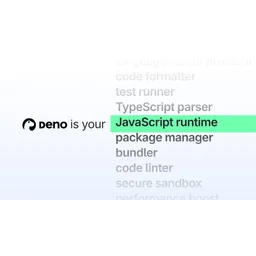
Deno
Developer Tools
A fast, open-source, fully Node-compatible JS runtime with TypeScript baked right in
- From
- Free
- Free plan
- Yes
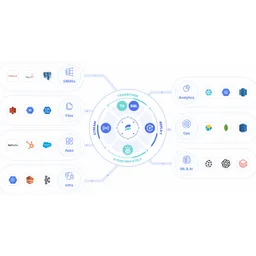
Estuary
Databases
Real-time data integration combining streaming, CDC, and batch
- From
- Free
- Free plan
- Yes
The short version
- Free plans on both; paid from $20/mo and $0.5/mo.
- Where Deno falls short: egress bandwidth overage costs $0.20/GB which can become expensive for high-traffic applications.
- Where Estuary falls short: Per-GB pricing adds up quickly for high-volume scenarios.
- Prices and features on this page were last checked on 13 November 2026.
Where they differ
Only the attributes on which Deno and Estuary actually diverge.
Identical on both: starting price (Free), free tier (Yes).
Not yet recorded: founded for Deno.
What each one covers
Drawn from each product's published feature list. An absence here means we hold no record of it - not that the product lacks it.
Only in Deno
Nothing recorded that Estuary does not also cover.
Only in Estuary
- Real-time data delivery
- Change data capture
- Batch processing
- Data transformation
- Pre-built connectors
- Multiple deployments
- RBAC and monitoring
What people use each for
The jobs each tool is most often brought in to do.
Deno
- Running TypeScript natively without transpilation overheadnot Estuary
- Migrating Node.js applications to secure-by-default runtimenot Estuary
- Deploying edge functions and serverless containers seamlesslynot Estuary
- Consolidating developer tools into single binarynot Estuary
Estuary
- Real-time data replication to data warehousesnot Deno
- Change data capture from operational databasesnot Deno
- Feeding analytics and BI systems with fresh datanot Deno
- Powering real-time AI and ML data pipelinesnot Deno
Where each one falls short
Documented limitations, not opinions. Every one is a constraint you would hit in normal use.
Deno
- Egress bandwidth overage costs $0.20/GB which can become expensive for high-traffic applications
- CPU time overage is $0.10/hour on Pro and Builder tiers, adding to costs for compute-intensive workloads
- Enterprise pricing is not disclosed; requires sales contact
Estuary
- Per-GB pricing adds up quickly for high-volume scenarios
- No transparent per-connector volume discounts below 6 connectors
- Limited to data movement; transformation capabilities are basic
- BYOC and private deployment requires enterprise plan
- Smaller ecosystem compared to established alternatives
Pricing, plan by plan
Deno
Free- FreeFree
- 1 million requests/month
- 20GB egress bandwidth
- 10 apps
- Pro$20/mo
- 5 million requests/month
- 200GB egress
- 50 apps
- Builder$200/mo
- 25 million requests/month
- 2,000GB egress
- 10,000 apps
- EnterpriseOn request
- Custom limits on all metrics
- 99.95% reliability SLA
- Email support with SLA
Estuary
Free- DeveloperFree
- 10 GB per month
- 2 connector instances maximum
- No credit card required
- Cloud$0.5/gb
- $0.50 per GB of data moved
- $100 per connector monthly (6+ connectors $50 each)
- 200+ connectors
- EnterpriseOn request
- Volume-based discounts
- SOC 2 and HIPAA compliance
- SSO authentication
Which should you pick?
Choose Estuary if
- You need real-time data delivery.
- You want to start without paying.
- You work on Web, BYOC.
- You also want change data capture.
Questions people ask
- Is Deno or Estuary better?
- Neither clearly leads. Deno starts at Free and Estuary at Free, and user ratings are close enough to be indistinguishable. Choose on capability and platform support.
- Which is cheaper, Deno or Estuary?
- Deno starts at Free and Estuary at Free.
- Does Deno or Estuary run on more platforms?
- Deno runs on Web. Estuary runs on Web, BYOC.
- Can I use Deno for free?
- Both have a free tier, so you can try either at no cost before committing.
- What is Deno best used for?
- Deno is most often used for running typescript natively without transpilation overhead, migrating node.js applications to secure-by-default runtime, deploying edge functions and serverless containers seamlessly, consolidating developer tools into single binary. Of those, running typescript natively without transpilation overhead and migrating node.js applications to secure-by-default runtime are not what Estuary is typically brought in for.
- What can Deno do that Estuary cannot?
- Estuary covers Real-time data delivery, Change data capture, Batch processing, Data transformation.
Answered from the vendors’ own pages
Deno: How much does Deno Deploy cost?
Deno Deploy offers a free tier at $0/month, Pro at $20/month, and Builder at $200/month. Enterprise has custom pricing. All plans include base request and bandwidth limits, with overage charges for additional usage.
SourceEstuary: What is included in the free Developer plan?
Developer plan ($0/month) includes 10 GB of data per month and up to 2 connector instances, no credit card required.
SourceDeno: What are Deno Deploy's overage charges?
Egress bandwidth overages cost $0.20 per GB. CPU time overages are $0.10 per hour on Pro and Builder tiers. Memory time and KV database operations also incur charges beyond included limits.
SourceEstuary: How is data pricing calculated on Cloud plan?
Cloud plan charges $0.50 per GB of data moved plus $100/month per connector for the first 6 connectors, then $50/month for additional connectors.
SourceDeno: How many apps can I deploy on Deno's free plan?
The free tier includes 10 apps with up to 1 concurrent build. Pro tier supports 50 apps with 3 concurrent builds, and Builder supports 10,000 apps with 20 concurrent builds.
SourceEstuary: What discount is available when adding 6+ connectors?
When using 6 or more connectors, the per-connector cost drops to $50/month from $100/month, saving $50 per additional connector.
SourceDeno: How many team members can access Deno Deploy?
The free tier supports up to 3 team members. Pro supports 10 team members. Builder supports 25 team members. Enterprise has custom seat limits.
SourceRelated pages
Other head to heads
- Deno vs Jitsu
- Deno vs WebStorm
- Deno vs Turborepo
- Deno vs Argo CD
- Deno vs Frappe
- Deno vs Git
- Deno vs Restate
- Deno vs Soketi
- Deno vs LaunchDarkly
- Deno vs Sublime Text
- Deno vs Vite
- Deno vs Bazel
- Deno vs Hookdeck
- Deno vs Istio
- Deno vs JFrog Artifactory
- Deno vs Namespace
- Deno vs Nix
- Deno vs Nixpacks
- Deno vs Fivetran HVR
- Deno vs Apache Druid
- Deno vs ClickHouse
- Deno vs Materialize
- Deno vs Redis
- Deno vs Firebase Realtime Database
- Deno vs SingleStore
- Deno vs Tinybird
- Deno vs Timeplus
- Deno vs Amazon Redshift
- Deno vs DataGrip
- Deno vs Firebolt
- Deno vs Apache Pinot
- Deno vs Apache Flink
- Deno vs Apache Kafka
- Deno vs Apache Pulsar
- Deno vs Cassandra
- Deno vs CouchDB
- Estuary vs Jitsu
- Estuary vs WebStorm
- Estuary vs Turborepo
- Estuary vs Argo CD
- Estuary vs Frappe
- Estuary vs Git
- Estuary vs Restate
- Estuary vs Soketi
- Estuary vs LaunchDarkly
- Estuary vs Sublime Text
- Estuary vs Vite
- Estuary vs Bazel
- Estuary vs Hookdeck
- Estuary vs Istio
- Estuary vs JFrog Artifactory
- Estuary vs Namespace
- Estuary vs Nix
- Estuary vs Nixpacks
- Estuary vs Fivetran HVR
- Estuary vs Apache Druid
- Estuary vs ClickHouse
- Estuary vs Materialize
- Estuary vs Redis
- Estuary vs Firebase Realtime Database
- Estuary vs SingleStore
- Estuary vs Tinybird
- Estuary vs Timeplus
- Estuary vs Amazon Redshift
- Estuary vs DataGrip
- Estuary vs Firebolt
- Estuary vs Apache Pinot
- Estuary vs Apache Flink
- Estuary vs Apache Kafka
- Estuary vs Apache Pulsar
- Estuary vs Cassandra
- Estuary vs CouchDB