
Databases · head to head
Estuary vs Pieces for Developers
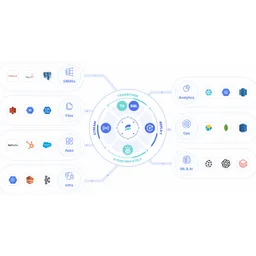
Estuary
Databases
Real-time data integration combining streaming, CDC, and batch
- From
- Free
- Free plan
- Yes

Pieces for Developers
Developer Tools
AI-powered memory layer that captures and organizes developer work
- From
- Free
- Free plan
- Yes
The short version
- Free plans on both; paid from $0.5/mo and $18.99/mo.
- Only Estuary lists real-time data delivery; only Pieces for Developers lists activity Timeline.
- Where Estuary falls short: Per-GB pricing adds up quickly for high-volume scenarios.
- Where Pieces for Developers falls short: requires installing and running a background desktop app rather than being purely cloud-based.
- Prices and features on this page were last checked on 29 August 2026.
Where they differ
Only the attributes on which Estuary and Pieces for Developers actually diverge.
| Attribute | Estuary | Pieces for Developers |
|---|---|---|
| Pricing model | Usage-based per GB plus per-connector cost | Freemium |
| Platforms | Web, BYOC | Windows, macOS, Linux |
| Category | Databases | Developer Tools |
| Founded | 2019 | 2018 |
Identical on both: starting price (Free), free tier (Yes).
What each one covers
Drawn from each product's published feature list. An absence here means we hold no record of it - not that the product lacks it.
Only in Estuary
- Real-time data delivery
- Change data capture
- Batch processing
- Data transformation
- Pre-built connectors
- Multiple deployments
- RBAC and monitoring
Only in Pieces for Developers
- Activity Timeline
- Conversational Search
- Artifact Generation
- Cross-tool Integration
- MCP Server
- On-device Storage
What people use each for
The jobs each tool is most often brought in to do.
Estuary
- Real-time data replication to data warehousesnot Pieces for Developers
- Change data capture from operational databasesnot Pieces for Developers
- Feeding analytics and BI systems with fresh datanot Pieces for Developers
- Powering real-time AI and ML data pipelinesnot Pieces for Developers
Pieces for Developers
- Recalling code snippets and context from earlier work sessionsnot Estuary
- Generating standup updates automatically from captured activitynot Estuary
- Feeding long-term memory into AI coding assistants via MCPnot Estuary
- Searching past research and meeting notes conversationallynot Estuary
Where each one falls short
Documented limitations, not opinions. Every one is a constraint you would hit in normal use.
Estuary
- Per-GB pricing adds up quickly for high-volume scenarios
- No transparent per-connector volume discounts below 6 connectors
- Limited to data movement; transformation capabilities are basic
- BYOC and private deployment requires enterprise plan
- Smaller ecosystem compared to established alternatives
Pieces for Developers
- Requires installing and running a background desktop app rather than being purely cloud-based
- Free tier trial of Pro features requires a credit card and reverts after 7 days
- Local-first storage means memory is not automatically synced across multiple machines without Enterprise controls
- Effectiveness depends on the breadth of integrations enabled, which adds setup overhead
Pricing, plan by plan
Estuary
Free- DeveloperFree
- 10 GB per month
- 2 connector instances maximum
- No credit card required
- Cloud$0.5/gb
- $0.50 per GB of data moved
- $100 per connector monthly (6+ connectors $50 each)
- 200+ connectors
- EnterpriseOn request
- Volume-based discounts
- SOC 2 and HIPAA compliance
- SSO authentication
Pieces for Developers
Free- FreeFree
- Basic capture and search
- 7-day trial of Pro features
- Pro$18.99/mo
- Long-term on-device memory
- Cross-app capture
- Single-click summaries and recaps
- Enterprise$22.99/mo
- All Pro features
- Organization-wide capture and feature controls
- Approved AI providers and custom API keys
Which should you pick?
Choose Estuary if
- You need real-time data delivery.
- You want to start without paying.
- You work on Web, BYOC.
- You also want change data capture.
Choose Pieces for Developers if
- You need activity timeline.
- You want to start without paying.
- You work on Windows, macOS, Linux.
- You also want conversational search.
Questions people ask
- Is Estuary or Pieces for Developers better?
- Neither clearly leads. Estuary starts at Free and Pieces for Developers at Free, and user ratings are close enough to be indistinguishable. Choose on capability and platform support.
- Which is cheaper, Estuary or Pieces for Developers?
- Estuary starts at Free and Pieces for Developers at Free.
- Does Estuary or Pieces for Developers run on more platforms?
- Estuary runs on Web, BYOC. Pieces for Developers runs on Windows, macOS, Linux.
- Can I use Estuary for free?
- Both have a free tier, so you can try either at no cost before committing.
- What is Estuary best used for?
- Estuary is most often used for real-time data replication to data warehouses, change data capture from operational databases, feeding analytics and bi systems with fresh data, powering real-time ai and ml data pipelines. Of those, real-time data replication to data warehouses and change data capture from operational databases are not what Pieces for Developers is typically brought in for.
- What can Estuary do that Pieces for Developers cannot?
- Estuary covers Real-time data delivery, Change data capture, Batch processing, Data transformation. Pieces for Developers covers Activity Timeline, Conversational Search, Artifact Generation, Cross-tool Integration.
Answered from the vendors’ own pages
Estuary: What is included in the free Developer plan?
Developer plan ($0/month) includes 10 GB of data per month and up to 2 connector instances, no credit card required.
SourcePieces for Developers: Does Pieces store my data in the cloud?
Pieces stores captured data on-device by default, giving users granular controls to pause, disable or delete captures rather than relying solely on cloud storage.
SourceEstuary: How is data pricing calculated on Cloud plan?
Cloud plan charges $0.50 per GB of data moved plus $100/month per connector for the first 6 connectors, then $50/month for additional connectors.
SourcePieces for Developers: Is there a free plan for Pieces?
Pieces does not offer a permanently free plan; new users instead get a 7-day free trial on any plan, which requires a credit card to start.
SourceEstuary: What discount is available when adding 6+ connectors?
When using 6 or more connectors, the per-connector cost drops to $50/month from $100/month, saving $50 per additional connector.
SourcePieces for Developers: What does the Pro plan cost?
Pro is $18.99 per month billed monthly, with roughly a 25% discount available when billed yearly.
SourcePieces for Developers: What does the Enterprise plan add?
Enterprise costs $22.99 per month (or $69.99 per quarter) and adds organization-wide admin controls, approved AI providers, and governance over captured data.
SourcePieces for Developers: Can I cancel my Pieces subscription?
Yes, users can upgrade, downgrade, or cancel anytime from account settings, and all plans include a 14-day money-back guarantee.
SourceRelated pages
More on Pieces for Developers
Other head to heads
- Estuary vs Fivetran HVR
- Estuary vs Apache Druid
- Estuary vs ClickHouse
- Estuary vs Materialize
- Estuary vs Redis
- Estuary vs Firebase Realtime Database
- Estuary vs SingleStore
- Estuary vs Tinybird
- Estuary vs Timeplus
- Estuary vs Amazon Redshift
- Estuary vs DataGrip
- Estuary vs Firebolt
- Estuary vs Apache Pinot
- Estuary vs Apache Flink
- Estuary vs Apache Kafka
- Estuary vs Apache Pulsar
- Estuary vs Cassandra
- Estuary vs CouchDB
- Estuary vs GitHub Copilot
- Estuary vs Moonrepo
- Estuary vs Refact
- Estuary vs PartyKit
- Estuary vs Sweep
- Estuary vs LaunchDarkly
- Estuary vs CodeSandbox
- Estuary vs Swagger UI
- Estuary vs Coder
- Estuary vs StackBlitz
- Estuary vs Deep Code
- Estuary vs Earthly
- Estuary vs Sourcegraph
- Estuary vs Storybook
- Estuary vs Visual Studio
- Estuary vs Warp
- Estuary vs WebStorm
- Estuary vs Xlinesoft
- Pieces for Developers vs Fivetran HVR
- Pieces for Developers vs Apache Druid
- Pieces for Developers vs ClickHouse
- Pieces for Developers vs Materialize
- Pieces for Developers vs Redis
- Pieces for Developers vs Firebase Realtime Database
- Pieces for Developers vs SingleStore
- Pieces for Developers vs Tinybird
- Pieces for Developers vs Timeplus
- Pieces for Developers vs Amazon Redshift
- Pieces for Developers vs DataGrip
- Pieces for Developers vs Firebolt
- Pieces for Developers vs Apache Pinot
- Pieces for Developers vs Apache Flink
- Pieces for Developers vs Apache Kafka
- Pieces for Developers vs Apache Pulsar
- Pieces for Developers vs Cassandra
- Pieces for Developers vs CouchDB
- Pieces for Developers vs GitHub Copilot
- Pieces for Developers vs Moonrepo
- Pieces for Developers vs Refact
- Pieces for Developers vs PartyKit
- Pieces for Developers vs Sweep
- Pieces for Developers vs LaunchDarkly
- Pieces for Developers vs CodeSandbox
- Pieces for Developers vs Swagger UI
- Pieces for Developers vs Coder
- Pieces for Developers vs StackBlitz
- Pieces for Developers vs Deep Code
- Pieces for Developers vs Earthly
- Pieces for Developers vs Sourcegraph
- Pieces for Developers vs Storybook
- Pieces for Developers vs Visual Studio
- Pieces for Developers vs Warp
- Pieces for Developers vs WebStorm
- Pieces for Developers vs Xlinesoft