
Automation Integration · head to head
Dagster vs Estuary

Dagster
Automation Integration
Data orchestration platform with asset lineage and AI-native observability
- From
- Free
- Rated
- -
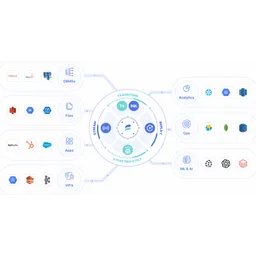
Estuary
Databases
Real-time data integration combining streaming, CDC, and batch
- From
- Free
- Rated
- -
The short version
- Each has a real cost: Dagster learning curve steeper than simpler task schedulers; Estuary per-GB pricing adds up quickly for high-volume scenarios
- They diverge on capability: Dagster covers Asset-centric orchestration, Estuary covers Real-time data delivery.
Where they differ
Only the attributes on which Dagster and Estuary actually diverge.
Identical on both: starting price (Free), free tier (Yes), user rating (Not yet rated).
What each one covers
Drawn from each product's published feature list. An absence here means we hold no record of it - not that the product lacks it.
Only in Dagster
- Asset-centric orchestration
- Lineage tracking
- Data quality monitoring
- Multi-tool integration
- Branch deployments
- Dagster+ AI
- Hybrid deployment
Only in Estuary
- Real-time data delivery
- Change data capture
- Batch processing
- Data transformation
- Pre-built connectors
- Multiple deployments
- RBAC and monitoring
What people use each for
The jobs each tool is most often brought in to do.
Dagster
- Orchestrating multi-stage data transformation pipelinesnot Estuary
- Tracking data lineage across transformation toolsnot Estuary
- Monitoring data quality and asset healthnot Estuary
- Coordinating dbt and Snowflake workflowsnot Estuary
Estuary
- Real-time data replication to data warehousesnot Dagster
- Change data capture from operational databasesnot Dagster
- Feeding analytics and BI systems with fresh datanot Dagster
- Powering real-time AI and ML data pipelinesnot Dagster
Where each one falls short
Documented limitations, not opinions. Every one is a constraint you would hit in normal use.
Dagster
- Learning curve steeper than simpler task schedulers
- Asset-centric model requires redesigning existing task-based pipelines
- Pricing complex with per-credit costs on top of base fee
- Open-source version requires self-hosting infrastructure
- Limited to data workflows; not suitable for general automation
Estuary
- Per-GB pricing adds up quickly for high-volume scenarios
- No transparent per-connector volume discounts below 6 connectors
- Limited to data movement; transformation capabilities are basic
- BYOC and private deployment requires enterprise plan
- Smaller ecosystem compared to established alternatives
Pricing, plan by plan
Dagster
Free- Open SourceFree
- Self-hosted deployment
- Full orchestration engine
- Community support
- Solo$10/month
- 1 user and 1 code location
- Pay-as-you-go credits at $0.040 per credit
- 1 deployment
- Starter$100/month
- Up to 3 users and 5 code locations
- Better credit rate at $0.035 per credit
- 1 deployment
- Pro$null/custom
- Unlimited code locations and deployments
- Custom serverless compute pricing
- Personalized onboarding
Estuary
Free- DeveloperFree
- 10 GB per month
- 2 connector instances maximum
- No credit card required
- Cloud$0.5/GB
- $0.50 per GB of data moved
- $100 per connector monthly (6+ connectors $50 each)
- 200+ connectors
- Enterprise$null/custom
- Volume-based discounts
- SOC 2 and HIPAA compliance
- SSO authentication
Which should you pick?
Choose Dagster if
- You need asset-centric orchestration.
- You want to start without paying.
- You work on Cloud, Self-hosted.
- You also want lineage tracking.
Choose Estuary if
- You need real-time data delivery.
- You want to start without paying.
- You work on Cloud, Private Cloud, BYOC.
- You also want change data capture.
Questions people ask
- Is Dagster or Estuary better?
- Neither clearly leads. Dagster starts at Free and Estuary at Free, and user ratings are close enough to be indistinguishable. Choose on capability and platform support.
- Which is cheaper, Dagster or Estuary?
- Dagster starts at Free and Estuary at Free.
- Does Dagster or Estuary run on more platforms?
- Dagster runs on Cloud, Self-hosted. Estuary runs on Cloud, Private Cloud, BYOC.
- Can I use Dagster for free?
- Both have a free tier, so you can try either at no cost before committing.
- What is Dagster best used for?
- Dagster is most often used for orchestrating multi-stage data transformation pipelines, tracking data lineage across transformation tools, monitoring data quality and asset health, coordinating dbt and snowflake workflows. Of those, orchestrating multi-stage data transformation pipelines and tracking data lineage across transformation tools are not what Estuary is typically brought in for.
- What can Dagster do that Estuary cannot?
- Dagster covers Asset-centric orchestration, Lineage tracking, Data quality monitoring, Multi-tool integration. Estuary covers Real-time data delivery, Change data capture, Batch processing, Data transformation.
Answered from the vendors’ own pages
Dagster: What does Solo plan at $10/month include?
Solo includes 1 user, 1 code location, 1 deployment, and serverless compute at $0.010/minute, with 30-day free trial.
SourceEstuary: What is included in the free Developer plan?
Developer plan ($0/month) includes 10 GB of data per month and up to 2 connector instances, no credit card required.
SourceDagster: How are credits calculated on Dagster+?
Each asset materialization and ops execution costs 1 credit. Solo plan charges $0.040 per credit; Starter reduces to $0.035 per credit.
SourceEstuary: How is data pricing calculated on Cloud plan?
Cloud plan charges $0.50 per GB of data moved plus $100/month per connector for the first 6 connectors, then $50/month for additional connectors.
SourceDagster: Is Dagster open-source available for free?
Yes, Dagster open-source is free and includes the full orchestration engine for self-hosted deployment with community support.
SourceEstuary: What discount is available when adding 6+ connectors?
When using 6 or more connectors, the per-connector cost drops to $50/month from $100/month, saving $50 per additional connector.
SourceRelated pages
Other head to heads
- Dagster vs n8n
- Dagster vs Zapier
- Dagster vs Microsoft Power Automate
- Dagster vs MuleSoft
- Dagster vs Parabola
- Dagster vs Airbyte
- Dagster vs Prefect
- Dagster vs Automation Anywhere
- Dagster vs Blue Prism
- Dagster vs CrewAI
- Dagster vs Fivetran
- Dagster vs Mage AI
- Dagster vs Temporal
- Dagster vs UiPath
- Dagster vs Workato
- Dagster vs Jitterbit
- Dagster vs mParticle
- Dagster vs Paragon
- Dagster vs Cockroach Labs
- Dagster vs PostgreSQL
- Dagster vs Airtable
- Dagster vs Amazon Aurora
- Dagster vs Elasticsearch
- Dagster vs Apache Kafka
- Dagster vs PlanetScale
- Dagster vs Meilisearch
- Dagster vs Turso
- Dagster vs Azure SQL
- Dagster vs ClickHouse
- Dagster vs Couchbase
- Dagster vs DuckDB
- Dagster vs MariaDB
- Dagster vs Oracle Database
- Dagster vs DataGrip
- Dagster vs Firebolt
- Dagster vs Google Cloud SQL
- Estuary vs n8n
- Estuary vs Zapier
- Estuary vs Microsoft Power Automate
- Estuary vs MuleSoft
- Estuary vs Parabola
- Estuary vs Airbyte
- Estuary vs Prefect
- Estuary vs Automation Anywhere
- Estuary vs Blue Prism
- Estuary vs CrewAI
- Estuary vs Fivetran
- Estuary vs Mage AI
- Estuary vs Temporal
- Estuary vs UiPath
- Estuary vs Workato
- Estuary vs Jitterbit
- Estuary vs mParticle
- Estuary vs Paragon
- Estuary vs Cockroach Labs
- Estuary vs PostgreSQL
- Estuary vs Airtable
- Estuary vs Amazon Aurora
- Estuary vs Elasticsearch
- Estuary vs Apache Kafka
- Estuary vs PlanetScale
- Estuary vs Meilisearch
- Estuary vs Turso
- Estuary vs Azure SQL
- Estuary vs ClickHouse
- Estuary vs Couchbase
- Estuary vs DuckDB
- Estuary vs MariaDB
- Estuary vs Oracle Database
- Estuary vs DataGrip
- Estuary vs Firebolt
- Estuary vs Google Cloud SQL