
Email Clients · head to head
Mailspring vs Nitro PDF
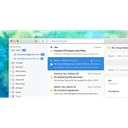
Mailspring
Email Clients
Open-source desktop email client with a paid Pro tier
- From
- Free
- Free plan
- Yes

Nitro PDF
Productivity
Edit, convert, secure, and sign PDF with annotation, OCR, and more
- From
- On request
- Free plan
- No
The short version
- Mailspring is an MIT-licensed email client for Mac, Windows and Linux.
- Mailspring starts at $8/mo; Nitro PDF prices on request.
- Where Mailspring falls short: calendar support is incomplete because a full calendar is still in development.
- Where Nitro PDF falls short: specific per-seat pricing is not published; must contact sales for individual plan pricing and volume discounts.
- Prices and features on this page were last checked on 26 November 2026.
How do Mailspring and Nitro PDF differ?
Mailspring and Nitro PDF differ on starting price (Free against On request), pricing model (Freemium against Quote) and free tier (Yes against No). Only the attributes on which Mailspring and Nitro PDF actually diverge.
| Attribute | Mailspring | Nitro PDF |
|---|---|---|
| Starting price | Free | On request |
| Pricing model | Freemium | Quote |
| Free tier | Yes | No |
| Platforms | macOS, Windows, Linux | Web |
| Category | Email Clients | Productivity |
Not yet recorded: founded for Mailspring.
Which features does each one have?
They share no listed features; 8 appear only for Mailspring. Drawn from each product's published feature list. An absence here means we hold no record of it - not that the product lacks it.
Only in Mailspring
- Unified inbox
- IMAP and Office 365 accounts
- Advanced search
- Themes and dark mode
- Read receipts on Pro
- Link tracking on Pro
- Send later on Pro
- Quick reply templates on Pro
Only in Nitro PDF
Nothing recorded that Mailspring does not also cover.
What is each one used for?
Mailspring is most often brought in for linux desktop email; Nitro PDF for PDF creation, editing, annotation, and form filling for document workflows. The jobs each tool is most often brought in to do.
Mailspring
- Linux desktop emailnot Nitro PDF
- Users who want an MIT-licensed clientnot Nitro PDF
- Individuals who want tracking and remindersnot Nitro PDF
- Light multi-account inboxesnot Nitro PDF
Nitro PDF
- PDF creation, editing, annotation, and form filling for document workflowsnot Mailspring
- E-signature workflows and document sending through Nitro Signnot Mailspring
- Enterprise document management with compliance featuresnot Mailspring
Where do Mailspring and Nitro PDF fall short?
Mailspring's most cited limit: calendar support is incomplete because a full calendar is still in development. Nitro PDF's: specific per-seat pricing is not published; must contact sales for individual plan pricing and volume discounts. Documented limitations, not opinions. Every one is a constraint you would hit in normal use.
Mailspring
- Calendar support is incomplete because a full calendar is still in development
- Desktop only, with apps for Mac, Windows and Linux
- Free tier limits snoozing, reminders and send later
- Read receipts and link tracking need the Pro plan
Nitro PDF
- Specific per-seat pricing is not published; must contact sales for individual plan pricing and volume discounts
- SSO and enterprise features (Azure Information Protection) are limited to Plus tier, not available in Standard
- Plans support up to 20 licenses online; teams needing 20+ users must contact sales
How much do Mailspring and Nitro PDF cost?
Mailspring has a free plan, with paid plans from $8/mo; Nitro PDF is priced on request. Plan by plan below, from each vendor's own pricing page.
Mailspring
Free- FreeFree
- Pro$8/mo
Nitro PDF
On request- Nitro PDF StandardOn request
- Nitro PDF PlusOn request
- Nitro PDF ClassicOn request
Which should you pick?
Choose Mailspring if
- You need unified inbox.
- You want to start without paying.
- You work on macOS, Windows, Linux.
- You also want imap and office 365 accounts.
Choose Nitro PDF if
Nothing in the data separates Nitro PDF from Mailspring on the points above - pick on price and on how each one feels to use.
Questions people ask
- Is Mailspring or Nitro PDF better?
- Neither clearly leads. Mailspring starts at Free and Nitro PDF at On request, and user ratings are close enough to be indistinguishable. Choose on capability and platform support.
- Which is cheaper, Mailspring or Nitro PDF?
- Mailspring has a free tier; the other does not. Paid plans start at Free for Mailspring and On request for Nitro PDF.
- Does Mailspring or Nitro PDF run on more platforms?
- Mailspring runs on macOS, Windows, Linux. Nitro PDF runs on Web.
- Can I use Mailspring for free?
- Yes. Mailspring has a free tier, so you can try it without paying. Nitro PDF starts at On request.
- What is Mailspring best used for?
- Mailspring is most often used for linux desktop email, users who want an mit-licensed client, individuals who want tracking and reminders, light multi-account inboxes. Of those, linux desktop email and users who want an mit-licensed client are not what Nitro PDF is typically brought in for.
- What can Mailspring do that Nitro PDF cannot?
- Mailspring covers Unified inbox, IMAP and Office 365 accounts, Advanced search, Themes and dark mode.
Answered from the vendors’ own pages
Mailspring: Is Mailspring open source?
Yes. The vendor says the full codebase is open source under the MIT licence and available on GitHub.
SourceNitro PDF: What are the main Nitro PDF plans and their pricing?
Nitro offers Standard and Plus tiers for PDF tools, plus Nitro Sign for e-signatures. Standard is an annual subscription with unlimited users and basic PDF features. Plus adds SSO, domain control, and Azure Information Protection. Specific pricing requires contacting Nitro sales. A 14-day free trial is available without a credit card.
SourceMailspring: How much is Mailspring Pro?
The site lists Mailspring Pro at 8 US dollars a month. Free users can test Pro features a few times each week.
SourceNitro PDF: What is the difference between Nitro PDF Standard and Plus?
Nitro PDF Standard includes core PDF creation, editing, annotation, OCR, AI tools, and team management. Plus adds enterprise security features including single sign-on (SSO), domain control, Azure Information Protection, Nitro Analytics, and a dedicated customer success manager for eligible customers.
SourceMailspring: Which operating systems are supported?
Mac, Windows and Linux, including ARM64 and Wayland on Linux.
SourceNitro PDF: Is there a perpetual license option for Nitro PDF?
Yes. Nitro PDF Classic is a one-time purchase for a 3-year license at a fixed price (not published online). It runs on Windows desktop only and includes core PDF tools. The Standard and Plus tiers are annual subscriptions.
SourceRelated pages
Other head to heads
- Mailspring vs Airmail
- Mailspring vs eM Client
- Mailspring vs Mailbird
- Mailspring vs Spike
- Mailspring vs Apple Mail
- Mailspring vs Edison Mail
- Mailspring vs MailMate
- Mailspring vs Foxit PDF Editor
- Mailspring vs PDF Expert
- Mailspring vs Sejda
- Mailspring vs Kami
- Mailspring vs iLovePDF
- Mailspring vs Anvil
- Mailspring vs Alfred
- Mailspring vs DocuSeal
- Mailspring vs RemNote
- Mailspring vs Ulysses
- Mailspring vs Gamma
- Mailspring vs SignWell
- Mailspring vs Hubstaff
- Mailspring vs BoldSign
- Mailspring vs Coggle
- Mailspring vs MindMeister
- Mailspring vs Canary Mail
- Mailspring vs Fastmail
- Nitro PDF vs Airmail
- Nitro PDF vs eM Client
- Nitro PDF vs Mailbird
- Nitro PDF vs Spike
- Nitro PDF vs Apple Mail
- Nitro PDF vs Edison Mail
- Nitro PDF vs MailMate
- Nitro PDF vs Foxit PDF Editor
- Nitro PDF vs PDF Expert
- Nitro PDF vs Sejda
- Nitro PDF vs Kami
- Nitro PDF vs iLovePDF
- Nitro PDF vs Anvil
- Nitro PDF vs Alfred
- Nitro PDF vs DocuSeal
- Nitro PDF vs RemNote
- Nitro PDF vs Ulysses
- Nitro PDF vs Gamma
- Nitro PDF vs SignWell
- Nitro PDF vs Hubstaff
- Nitro PDF vs BoldSign
- Nitro PDF vs Coggle
- Nitro PDF vs MindMeister
- Nitro PDF vs Canary Mail
- Nitro PDF vs Fastmail